

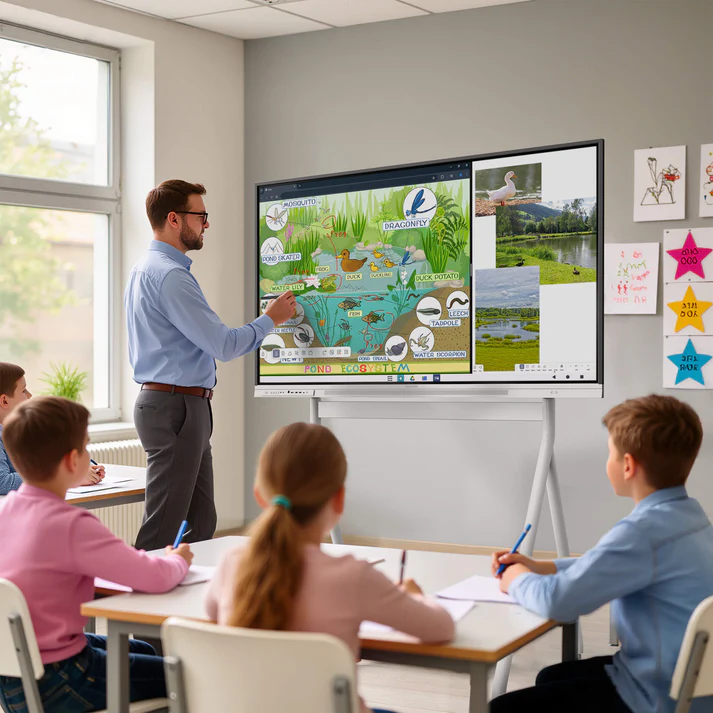
Choosing the right classroom display platform requires a balanced evaluation of modern operating systems, security baselines, and teacher-centric features. School districts should ensure that their capital investments yield high instructional value while demanding minimal configuration and technical troubleshooting from IT staff. When comparing Nework vs other smart boards, identifying which interactive displays successfully lower implementation barriers is key to upgrading public or private K-12 classrooms.
The hardware solutions behind these highly collaborative classroom setups are engineered by Nework, an innovative audiovisual technology firm headquartered in California. This enterprise focuses on interactive hardware designed to streamline group workflows, reduce installation complexity, and decrease long-term operational costs for schools and businesses. Buyers looking to upgrade their infrastructure can explore the complete lineup and secure robust educational models by visiting the official Nework.ai portal to consult with collaboration experts.
The Evolution of Classroom Android Operating Systems
Interactive displays rely heavily on their underlying operating systems to provide fluid, responsive, and secure digital teaching spaces. Older whiteboard technologies often run outdated software platforms that lack security updates, leaving school networks exposed to digital vulnerabilities.
By contrast, selecting the NewBoard E series for education provides schools with the highly secure Android 14 operating system. This modern software platform offers enhanced security, seamless updates, and teacher-ready features designed to keep instructional apps running smoothly and securely over multiple school years.
Navigating Google EDLA Certification for Education
Modern lesson planning requires instant, secure access to popular cloud-based apps, digital templates, and online educational platforms. Uncertified interactive boards often restrict software options, forcing IT administrators to sideload applications manually.
A certified Nework smart board integrates official Google Enterprise Devices Licensing Agreement (EDLA) credentials directly into its interface. This important standard guarantees native access to the Google Play Store, Google Classroom, and Google Drive, streamlining software deployment for technical teams.
Simplifying Classroom Connectivity with Single Cable Standards
Passing multiple signal, touch, and audio cables through walls or across desks increases setup complexity and installation labor. Teachers frequently face technical delays when trying to link personal laptops or tablets to older projector-based setups.
Adopting USB-C One-Cable Teaching allows instructors to plug in their devices and begin presenting material to the class instantly. This single high-speed interface delivers 4K video signals, transfers touch control data, and charges the connected laptop with up to 65W of power.
Accelerating Post Lesson Distribution with Instant Sharing
Taking manual notes from a digital whiteboard or printing physical worksheets after class wastes valuable instructional hours and consumes unnecessary materials. Teachers need an efficient, paperless method to distribute annotated lesson summaries to students immediately.
The integration of Instant QR Sharing allows educators to generate a secure QR code directly on the screen at the end of class. Students simply scan this code with their personal devices to receive lesson notes, annotations, and marked-up documents instantly.
Maximizing Instructional Real Estate with Multitasking Tools
Modern pedagogy relies heavily on comparative learning, requiring teachers to show educational videos alongside interactive writing boards. Standard displays often lack the processing power or interface options to run multiple demanding applications simultaneously.
The NewBoard E series for education features robust split-screen functionalities supported by an efficient octa-core processor and 8GB RAM. This robust setup allows teachers to present high-definition instructional media on one side of the screen while utilizing the whiteboard canvas on the other.
Ensuring Visual Accessibility from Every Classroom Corner
Traditional display panels often suffer from poor contrast, low brightness, or severe reflection when viewed from angled student desks. If students at the far sides of a classroom cannot see diagrams clearly, their overall academic engagement decreases.
This hardware features a great 4K UHD display with a Wide 178° Viewing angle and anti-glare tempered glass. This engineering standard ensures that high-definition STEM visuals, mathematical formulas, and tiny fonts remain highly visible from any seat in the room.
Delivering Immersive Audio Without External Systems
Clear speech comprehension remains a fundamental prerequisite for successful learning, particularly during language arts lessons or multimedia presentations. Many standard displays include underpowered speakers that fail to project audio evenly across large educational spaces.
To resolve this issue, the Nework smart board comes equipped with built-in Dual 20W front-firing speakers. These high-fidelity speakers project rich, balanced sound directly into the classroom, reducing the need for schools to purchase and install expensive external sound systems.
Fostering Collaborative Learning with High Precision Touch
Promoting collaborative problem-solving requires an interactive surface that can accurately track multiple students working side-by-side. Low-tier touch screens often lag, misinterpret touch gestures, or drop input signals when multiple pens are used at once.
With 50-point precise touch control and an ultra-low 8ms writing latency, the interface provides a highly natural, paper-like writing experience. Students can annotate slides, sketch diagrams, and collaborate on the screen at the same time without encountering performance lag.
Conclusion
Comparing advanced classroom technology against older legacy platforms demonstrates the value of choosing integrated, certified ecosystems. With features like Google EDLA certification, USB-C teaching options, and instant QR sharing, the NewBoard E series for education simplifies daily instruction. Deciding on a durable, well-supported display brand allows K-12 schools to decrease administrative maintenance overhead while providing teachers and students with highly intuitive collaborative tools.
